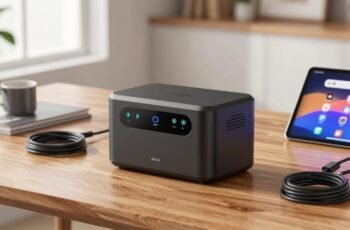
While traditional portable generators have long served remote power needs, WiFi-connected battery generators introduce a new level of operational insight and control that was previously unavailable. These devices combine high-capacity batteries with embedded WiFi modules, enabling remote monitoring and management, which can greatly enhance efficiency and reliability. Understanding how they work and what features to prioritize can be essential for ideal deployment—yet the complexities behind their setup and potential issues warrant careful consideration before integration.
Key Takeaways
- WiFi-connected battery generators enable remote monitoring of battery status, load levels, and operational parameters via dedicated apps or web interfaces.
- Key features include high battery capacity, inverter efficiency, secure WiFi modules, fast charging, and encrypted data transmission.
- Proper setup involves connecting to a secure WiFi network, configuring network settings, and linking devices through unique IDs or QR codes.
- Common issues like signal interference, outdated firmware, or incorrect network settings can disrupt connectivity.
- Troubleshooting involves optimizing placement, updating firmware, adjusting network settings, and reducing interference to ensure reliable operation.
What Are WiFi Connected Battery Generators and How Do They Work?
WiFi connected battery generators are portable power sources integrated with wireless communication capabilities, enabling remote monitoring and control. They utilize embedded WiFi modules that connect to local networks, allowing users to access real-time data via dedicated applications or web interfaces. Internally, these generators house lithium-ion or similar batteries coupled with power management systems that regulate charging and discharging processes, ensuring efficiency and safety. The WiFi connectivity facilitates remote diagnostics, usage analytics, and control over power output, often through customizable interfaces. Data transmitted includes battery status, load levels, and operational metrics, which can be used for predictive maintenance or optimization. This integration of communication technology enhances operational transparency, simplifies management, and supports automation, making WiFi connected battery generators a sophisticated solution for portable power needs.
Key Features to Look for in a WiFi-Connected Battery Generator
When selecting a WiFi-connected battery generator, it’s crucial to focus on key features that guarantee reliable performance, user convenience, and system integration. Critical parameters include battery capacity, which determines runtime and power output stability; inverter efficiency, affecting energy conversion and overall system performance; and WiFi module robustness, ensuring seamless connectivity and remote monitoring. Additionally, fast charging capabilities reduce downtime, while secure, encrypted connections safeguard against cyber threats. Compatibility with existing smart home or management systems enhances integration, and user-friendly interfaces simplify operation. Real-time data analytics and alert systems improve maintenance and troubleshooting. These features collectively guarantee the generator’s efficiency, security, and ease of use, making them essential considerations for selecting a dependable WiFi-enabled power solution.
Benefits of Using WiFi-Enabled Portable Power Solutions
The integration of WiFi connectivity into portable power solutions substantially enhances their operational flexibility and user management. By enabling remote control, users can efficiently monitor power levels, set operational parameters, and receive real-time alerts, reducing downtime and optimizing performance. WiFi-enabled systems facilitate centralized management, allowing multiple devices to be coordinated seamlessly within complex setups, which is vital for emergency or large-scale applications. Additionally, data logging capabilities provide valuable insights into power consumption patterns, aiding predictive maintenance and system upgrades. This technological advantage minimizes manual intervention and improves reliability, especially in remote or inaccessible locations. Overall, WiFi connectivity transforms traditional portable power units into intelligent, adaptable solutions that support proactive management and operational efficiency.
How to Set Up and Monitor Your WiFi Battery Generator Remotely
To enable remote operation, we first connect the generator to a secure WiFi network, ensuring reliable communication. Then, we utilize a dedicated mobile app to monitor real-time metrics such as charge level, output, and system status. This setup provides precise control and immediate visibility into the generator’s performance from any location.
Connecting to WiFi Network
Ever wondered how to seamlessly connect your battery generator to a WiFi network for remote monitoring? The process involves configuring the device’s network settings via its interface or companion app, making sure it recognizes your local network. Once connected, the generator’s IP address and network credentials become vital for remote access. To simplify, consider this configuration table:
| Step | Action | Notes |
|---|---|---|
| 1 | Access settings | Use onboard display or app |
| 2 | Select WiFi network | Input SSID and password |
| 3 | Confirm connection | Verify IP address assigned |
This setup demands precise input of network credentials and an understanding of network topology. Proper configuration ensures stable connectivity, enabling continuous data transmission to your monitoring platform without interruption or security concerns.
Monitoring via Mobile App
Once your battery generator is connected to the WiFi network, setting up remote monitoring through a mobile app becomes a straightforward process. Typically, this involves downloading the manufacturer’s app from app stores, then linking the device via a unique device ID or QR code. The app accesses real-time data, including battery status, charge levels, and voltage, through secure protocols. Configuration options allow us to set alerts for low charge or system faults, enhancing operational oversight. The app’s interface displays detailed analytics, enabling us to monitor performance trends and anticipate maintenance needs. Ensuring proper network security, such as WPA2 encryption, is vital. Overall, this setup provides immediate, remote insight into the generator’s operational health, streamlining management and optimizing reliability.
Top Considerations When Choosing a WiFi Connected Battery Generator
When selecting a WiFi-connected battery generator, evaluating connectivity features is essential to guarantee seamless remote management and integration with existing systems. Additionally, understanding the power capacity helps determine whether the unit can meet your energy needs under various load conditions. Focusing on these core aspects allows for an informed choice that balances functionality and performance.
Connectivity Features
What key connectivity features should we prioritize when selecting a WiFi-connected battery generator? First, reliable and secure WiFi protocols are essential to guarantee stable remote access and protect against cyber vulnerabilities. Dual-band WiFi (2.4GHz and 5GHz) enhances connectivity flexibility and reduces interference. Compatibility with common remote management platforms or mobile apps is also critical, allowing seamless monitoring and control across devices. Additionally, real-time data transmission capabilities, such as live status updates on charge levels and system diagnostics, improve operational awareness. Ethernet port presence offers alternative wired access, useful in congested or unstable WiFi environments. Finally, firmware update functionality over the network ensures the device remains current with security patches and feature enhancements, reflecting a focus on robustness and longevity of connectivity features.
Power Capacity
The power capacity of a WiFi-connected battery generator is a critical factor that determines its suitability for specific applications and energy demands. Higher capacity guarantees longer operation times and the ability to power multiple devices simultaneously. It’s essential to match the generator’s capacity with expected energy loads to prevent shortages or inefficiencies. Overestimating capacity can lead to unnecessary costs, while underestimating may compromise performance. Consider the following:
| Capacity Range | Suitable Applications |
|---|---|
| 0-500 Wh | Small devices, emergency backup |
| 500-1000 Wh | Portable electronics, small appliances |
| 1000-2000 Wh | Home backup, outdoor activities |
| 2000-5000 Wh | Whole-house backup, larger appliances |
| 5000+ Wh | Industrial use, extensive energy needs |
Choosing the right capacity balances performance with cost, ensuring reliable power tailored to your needs.
Troubleshooting Common Issues With Wifi Battery Generators
Despite their convenience, wifi battery generators can encounter connectivity and performance issues that hinder their reliability. Common problems include intermittent connection drops, slow data transfer, or failure to sync with devices. These issues often stem from signal interference, outdated firmware, or network configuration errors. To troubleshoot, we start by verifying the generator’s wifi signal strength and ensuring it’s within ideal range. Next, we check for firmware updates, as outdated software can cause stability problems. Additionally, inspecting network settings such as IP configuration or security protocols helps identify conflicts. If interference persists, relocating the generator away from other electronic devices or changing wifi channels can improve stability. Systematic analysis of these factors allows us to pinpoint root causes and restore consistent connectivity, ensuring reliable operation.
Frequently Asked Questions
Can Wifi Battery Generators Integrate With Smart Home Systems?
Yes, WiFi-connected battery generators can integrate with smart home systems, enabling remote control, automation, and monitoring. We analyze their compatibility, communication protocols, and security features to guarantee seamless, reliable integration for enhanced home energy management.
What Is the Typical Battery Lifespan of Wifi-Connected Generators?
Typically, wifi-connected battery generators last around 3 to 5 years, with lithium-ion models averaging 4 years. Regular maintenance and proper usage can extend their lifespan, ensuring reliable backup during outages and optimizing long-term investment value.
Are Wifi Generators Suitable for Outdoor or Harsh Environments?
WiFi generators are generally suitable for outdoor, harsh environments if they feature ruggedized enclosures, corrosion-resistant materials, and weatherproof seals. We analyze environmental factors to guarantee ideal performance, but caution is advised for extreme conditions without proper protection.
How Secure Is the Wifi Connection on These Battery Generators?
The wifi connection on these generators is like a fortress with multiple layers of encryption, making it highly secure; however, no system is infallible, so users should implement strong passwords and regular firmware updates for maximum safety.
Do Wifi-Enabled Battery Generators Support Automatic Firmware Updates?
Yes, wifi-enabled battery generators typically support automatic firmware updates, allowing seamless security patches and feature improvements. These updates guarantee the device remains protected and functions ideally, though user approval or connection stability may influence update schedules.
Conclusion
In wrapping up, WiFi-connected battery generators are like digital sentinels, silently monitoring and powering our most critical moments. Their seamless integration offers real-time insights, transforming how we manage energy remotely. As we evaluate features and troubleshoot issues, we’re constructing a resilient, intelligent power network—one that stands firm in remote landscapes or during unexpected outages. Embracing these advanced solutions means stepping into a future where power is reliable, accessible, and effortlessly controlled at our fingertips.